

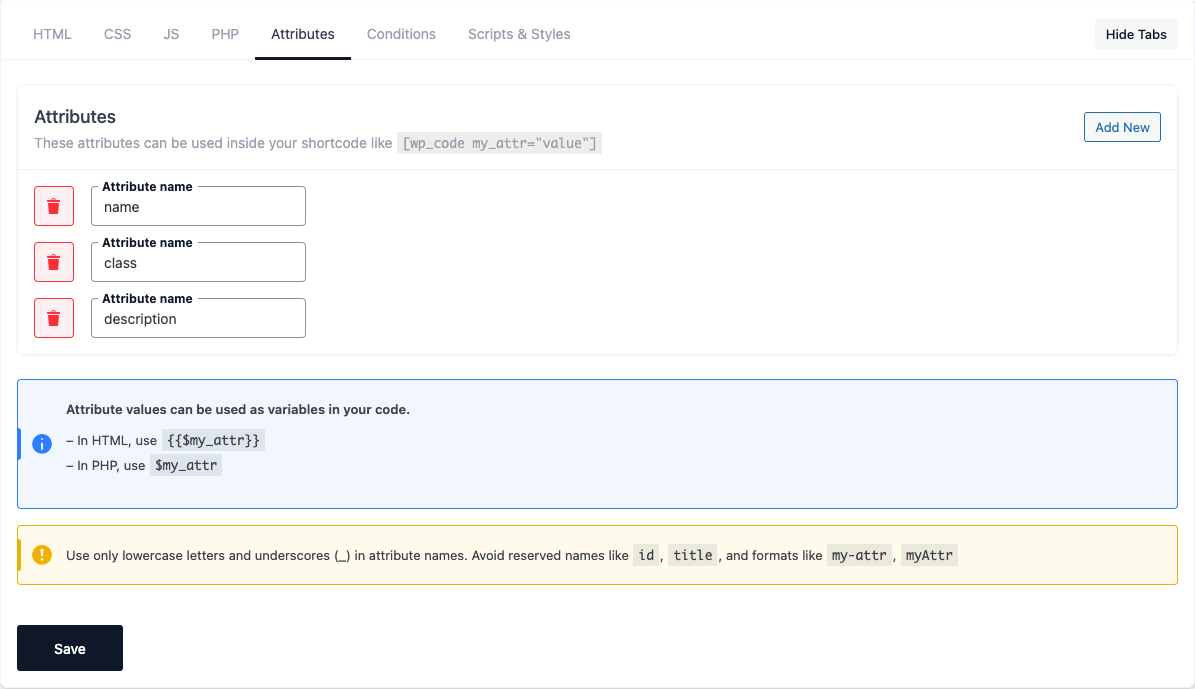
The Attributes tab lets you define dynamic input fields whose values you can inject into the
snippet’s HTML, CSS, JS and PHP. Each attribute is one row with three settings:
| Setting | Purpose |
|---|---|
| Attribute name | The variable name used in your code and as the shortcode attribute. |
| Default value | The value used when none is passed (and, for a repeater, the sub-field setup). |
| Field Type | How the value is edited and processed (see the types table below). |
Rows can be reordered by their drag handle and removed with the trash icon. Add New adds a blank
row.
Passing attribute values
Defined attributes become shortcode attributes (and Gutenberg block attributes):
When the snippet renders, each passed value (or the saved Default value) is exposed to your code.
Using attribute values in code
For an attribute named my_attr:
| Context | Syntax | Notes |
|---|---|---|
| HTML | {{$my_attr}} |
Replaced with the value. |
| CSS | {{$my_attr}} |
Inline CSS only (when Inline is enabled). |
| JS | {{$my_attr}} |
Inline JS only; inserted in a JavaScript-safe form. |
| PHP | $my_attr |
Available as a variable. |
| Repeater | wpcoder_get_repeater( $my_repeater ) |
Returns the rows as an array. |
| Icon | <i class="{{$icon}}"></i> |
The value is the full Font Awesome class. |
Naming rules
Use lowercase letters and underscores only (my_attr). Avoid:
- reserved names like
idandtitle(used by the shortcode itself), - dashes (
my-attr) and camelCase (myAttr).
Field types
All available field types:
| Type | What it stores | Notes |
|---|---|---|
| Text (Single line) | Plain text | Used as-is. |
| Textarea (Multi line) | Multi-line text | Line breaks become <br>. |
| Rich Text | Formatted HTML | Safe HTML is kept. |
| Number | A number | Inserted unquoted in inline JS. |
| Range/Slider | A number 0–100 | Slider value. |
| Select/Dropdown | The chosen option | |
| Image Upload | An image | Expanded into image sub-variables (see below). |
| Image Upload (with Preload) | An image | Same sub-variables, plus a <link rel="preload"> is added for faster loading. |
| Font Awesome Icon | An icon class | Use inside <i class="{{$name}}">. |
| URL/Link | A URL | |
| Date/Time Picker | A date/time | |
| Color Picker (Simple) | A color | |
| Color Picker (Advanced) | A color | |
| Gradient Picker | A CSS gradient | |
| Repeater (Complex Data) | Multiple rows | See Repeater below. |
Image sub-variables
For an image attribute named hero, the image URL is expanded into ready-to-use placeholders:
| Placeholder | Description |
|---|---|
{{$hero}} / {{$hero_url}} |
Raw image URL |
{{$hero_alt}} |
Alt text |
{{$hero_width}} / {{$hero_height}} |
Width / height in pixels |
{{$hero_srcset}} / {{$hero_sizes}} |
srcset / sizes values |
{{$hero_loading}} |
loading value (lazy or empty) |
{{$hero_fetchpriority}} |
fetchpriority value (high or empty) |
{{$hero_decoding}} |
decoding value (async or empty) |
{{$hero_html}} |
Full <img> tag with WordPress loading optimization applied |
{{$hero_html_high}} |
<img> tag with fetchpriority="high" forced (for images outside the main loop) |
Use {{$hero_html}} for normal images (WordPress decides eager vs. lazy) and {{$hero_html_high}}
when you need to force priority regardless of position. The same sub-variables work for image fields
inside a repeater (e.g. {{loop.photo_html}}).
Repeater (Complex Data)
A repeater stores a list of rows. Its Default value holds the sub-field setup, edited through
the Edit Repeater Fields dialog.
Setup format: field_name:type,field_name2:type2 — a comma-separated list of sub-fields.
Supported sub-field types: text, textarea, richtext, number, url, image, color,
gradient, range, date, icon, and select.
Select sub-fields put their options after a third colon:
- value only:
status:select:active|draft value=Label:size:select:s=Small|m=Medium|l=Large
Full example:
title:text,body:textarea,photo:image,link:url,qty:number,status:select:active=Active|draft=DraftUsing a repeater in code:
- PHP:
foreach ( wpcoder_get_repeater( $my_repeater ) as $row ) { echo $row['title']; } - HTML (with Loop Logic):
<Loop field="my_repeater"> {{loop.title}} {{loop.photo_html}} </Loop>
See 10.Loop-Logic.md for the full loop reference.
Helpers (PHP tab)
wpcoder_get_repeater( $attr )— returns a repeater’s rows as an array.wpcoder_mmd( $text )— renders Markdown to HTML.